NinjaTrader Installation Instructions
NinjaTrader 8 Video Installation Instructions
Watch the YouTube video MBoxWave for NinjaTrader Installation / Upgrade Instructions . I cover MBoxWave installation, setup, chart configuration, loading workspaces, and saving chart templates
NinjaTrader 8 First Time Installation Instructions
1. MAKE SURE TO DO THIS STEP FIRST: Set your NinjaTrader Machine ID here
2. Make sure you did Step 1!!! If you don't set your Machine ID, the indicators will NOT work.
3. It is recommend to Download and install the latest version of NinjaTrader 8 (but this is not necessarily required)
4. Download latest version of MBoxWave for NinjaTrader 8 here (Save zip file to your desktop)
5. In NT8, goto Tools -> Import -> NinjaScript Add-On
6. Browse to your desktop and open downloaded zip file
7. Open a chart, right click and choose Indicators to select any of the MBoxWave indicators
NinjaTrader 8 Upgrade Instructions
1. MAKE SURE TO DO THIS STEP FIRST: Set your NinjaTrader Machine ID here
2. Make sure you did Step 1!!! If you don't set your Machine ID, the indicators will NOT work.
3. It is recommend to Download and install the latest version of NinjaTrader 8 (but this is not necessarily required)
4. Download latest version of MBoxWave for NinjaTrader 8 here (Save zip file to your desktop)
5. Quit NinjaTrader 8
6. Extract the contents of MBoxWave_NT8.zip to "Documents\NinjaTrader 8\bin\Custom" and allow overwrite of files
7. Start NinjaTrader 8
NinjaTrader 7 Installation Instructions
1. MAKE SURE TO DO THIS STEP FIRST: Set your NinjaTrader Machine ID here
2. Make sure you did Step 1!!! If you don't set your Machine ID, the indicators will NOT work.
3. Download latest version of MBoxWave for NinjaTrader 7 here (Save zip file to your desktop)
4. In NinjaTrader, goto File -> Utilities -> Import NinjaScript
5. Browse to your desktop and open downloaded zip file
6. Open a chart, right click and choose Indicators to select any of the MBoxWave indicators
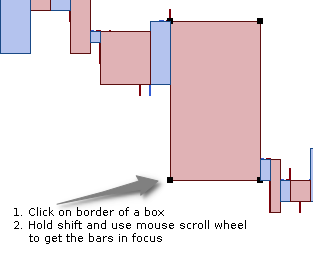
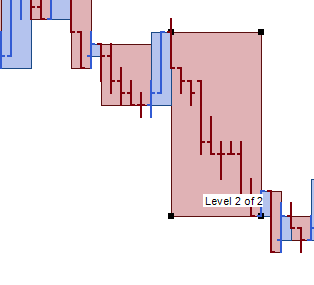
In order to see the bars inside the boxes (Only applies to NinjaTrader 7)
In NinjaTrader 7 you need to change display order level of the boxes in order to see the bars inside them. In NinjaTrader 8 this is done automatically.
 |
 |
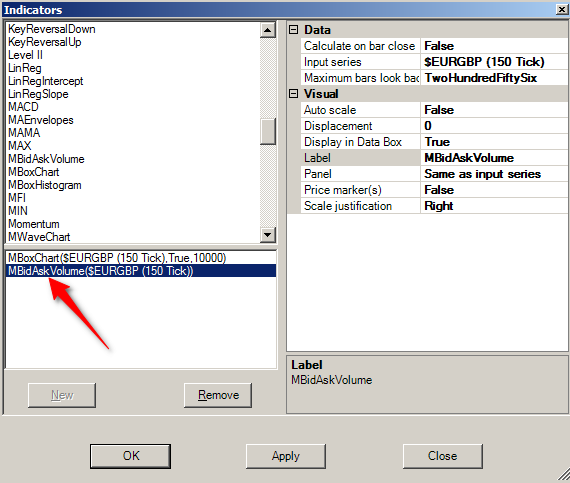
In order to see Bid / Ask, and Delta Volume (Only applies to NinjaTrader 7)
You need to load the MBidAskVolume indicator! Otherwise you will see 0.
This is explained on the Indicator Settings page
 |